41 sections
http://www.w3schools.com/sql/
62 Sections
4 Queries/day
SQL JOIN: is used to combine records from two or more tables in a database. A JOIN is a means for combining fields from two tables by using values common to each.
TutorialsPoint
(a) CUSTOMERS table is as follows:
+----+----------+-----+-----------+----------+
| ID | NAME     | AGE | ADDRESS   | SALARY   |
+----+----------+-----+-----------+----------+
|  1 | Ramesh   |  32 | Ahmedabad |  2000.00 |
|  2 | Khilan   |  25 | Delhi     |  1500.00 |
|  3 | kaushik  |  23 | Kota      |  2000.00 |
|  4 | Chaitali |  25 | Mumbai    |  6500.00 |
|  5 | Hardik   |  27 | Bhopal    |  8500.00 |
|  6 | Komal    |  22 | MP        |  4500.00 |
|  7 | Muffy    |  24 | Indore    | 10000.00 |
+----+----------+-----+-----------+----------+
(b) Another table is ORDERS as follows:
+-----+---------------------+-------------+--------+
| OID | DATE                | CUSTOMER_ID | AMOUNT |
+-----+---------------------+-------------+--------+
| 102 | 2009-10-08 00:00:00 |           3 |   3000 |
| 100 | 2009-10-08 00:00:00 |           3 |   1500 |
| 101 | 2009-11-20 00:00:00 |           2 |   1560 |
| 103 | 2008-05-20 00:00:00 |           4 |   2060 |
+-----+---------------------+-------------+--------+
 SELECT  ID, NAME, AMOUNT, DATE
     FROM CUSTOMERS
     INNER JOIN ORDERS
     ON CUSTOMERS.ID = ORDERS.CUSTOMER_ID;
This would produce the following result:
+----+----------+--------+---------------------+
| ID | NAME     | AMOUNT | DATE                |
+----+----------+--------+---------------------+
|  3 | kaushik  |   3000 | 2009-10-08 00:00:00 |
|  3 | kaushik  |   1500 | 2009-10-08 00:00:00 |
|  2 | Khilan   |   1560 | 2009-11-20 00:00:00 |
|  4 | Chaitali |   2060 | 2008-05-20 00:00:00 |
+----+----------+--------+---------------------+
W3Schools
INNER JOIN keyword selects all rows from both tables as long as there is a match between the columns in both tables.
SELECT table1.column1, table2.column2...
FROM table1
INNER JOIN table2
ON table1.common_field = table2.common_field;
SELECT column_name(s)
FROM table1
JOIN table2
ON table1.column_name=table2.column_name;
INNER JOIN is the same as JOIN.
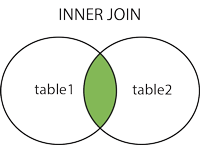
SQL INNER JOIN: returns all rows from multiple tables where the join condition is met.
"Orders" table:
| OrderID | CustomerID | OrderDate |
|---|---|---|
| 10308 | 2 | 1996-09-18 |
| 10309 | 37 | 1996-09-19 |
| 10310 | 77 | 1996-09-20 |
"Customers" table:
| CustomerID | CustomerName | ContactName | Country |
|---|---|---|---|
| 1 | Alfreds Futterkiste | Maria Anders | Germany |
| 2 | Ana Trujillo Emparedados y helados | Ana Trujillo | Mexico |
| 3 | Antonio Moreno Taquería | Antonio Moreno | Mexico |
"CustomerID" column in the "Orders" table refers to the "CustomerID" in the "Customers" table.
SELECT Orders.OrderID, Customers.CustomerName, Orders.OrderDate
FROM Orders
INNER JOIN Customers
ON Orders.CustomerID=Customers.CustomerID;
it will produce something like this:
| OrderID | CustomerName | OrderDate |
|---|---|---|
| 10308 | Ana Trujillo Emparedados y helados | 9/18/1996 |
| 10365 | Antonio Moreno Taquería | 11/27/1996 |
| 10383 | Around the Horn | 12/16/1996 |
| 10355 | Around the Horn | 11/15/1996 |
| 10278 | Berglunds snabbköp | 8/12/1996 |
-
INNER JOIN: returns rows when there is a match in both tables.
-
LEFT JOIN: returns all rows from the left table, even if there are no matches in the right table.
-
RIGHT JOIN: returns all rows from the right table, even if there are no matches in the left table.
-
FULL JOIN: returns rows when there is a match in one of the tables.
-
SELF JOIN: is used to join a table to itself as if the table were two tables, temporarily renaming at least one table in the SQL statement.
-
CARTESIAN JOIN: returns the Cartesian product of the sets of records from the two or more joined tables.
ow is a selection from the "Customers" table:
CustomerID CustomerName ContactName Address City PostalCode Country 1 Alfreds Futterkiste Maria Anders Obere Str. 57 Berlin 12209 Germany 2 Ana Trujillo Emparedados y helados Ana Trujillo Avda. de la Constitución 2222 México D.F. 05021 Mexico 3 Antonio Moreno Taquería Antonio Moreno Mataderos 2312 México D.F. 05023 Mexico
And a selection from the "Orders" table:
OrderID CustomerID EmployeeID OrderDate ShipperID 10308 2 7 1996-09-18 3 10309 37 3 1996-09-19 1 10310 77 8 1996-09-20 2
INNER JOIN: returns rows when there is a match in both tables.
LEFT JOIN: returns all rows from the left table, even if there are no matches in the right table.
RIGHT JOIN: returns all rows from the right table, even if there are no matches in the left table.
FULL JOIN: returns rows when there is a match in one of the tables.
SELF JOIN: is used to join a table to itself as if the table were two tables, temporarily renaming at least one table in the SQL statement.
CARTESIAN JOIN: returns the Cartesian product of the sets of records from the two or more joined tables.
ow is a selection from the "Customers" table:
| CustomerID | CustomerName | ContactName | Address | City | PostalCode | Country |
|---|---|---|---|---|---|---|
| 1 | Alfreds Futterkiste | Maria Anders | Obere Str. 57 | Berlin | 12209 | Germany |
| 2 | Ana Trujillo Emparedados y helados | Ana Trujillo | Avda. de la Constitución 2222 | México D.F. | 05021 | Mexico |
| 3 | Antonio Moreno Taquería | Antonio Moreno | Mataderos 2312 | México D.F. | 05023 | Mexico |
And a selection from the "Orders" table:
| OrderID | CustomerID | EmployeeID | OrderDate | ShipperID |
|---|---|---|---|---|
| 10308 | 2 | 7 | 1996-09-18 | 3 |
| 10309 | 37 | 3 | 1996-09-19 | 1 |
| 10310 | 77 | 8 | 1996-09-20 | 2 |
SQL INNER JOIN Example
The following SQL statement will return all customers with orders:
The following SQL statement will return all customers with orders:
Example
SELECT Customers.CustomerName, Orders.OrderID
FROM Customers
INNER JOIN Orders
ON Customers.CustomerID=Orders.CustomerID
ORDER BY Customers.CustomerName;
Note: The INNER JOIN keyword selects all rows from both tables as long as there is a match between the columns. If there are rows in the "Customers" table that do not have matches in "Orders", these customers will NOT be listed.
-------------------------------------------------------------------------------------------------
Interview Questions: Inner Join
SELECT Customers.CustomerName, Orders.OrderID
FROM Customers
INNER JOIN Orders
ON Customers.CustomerID=Orders.CustomerID
ORDER BY Customers.CustomerName;
Note: The INNER JOIN keyword selects all rows from both tables as long as there is a match between the columns. If there are rows in the "Customers" table that do not have matches in "Orders", these customers will NOT be listed.
-------------------------------------------------------------------------------------------------
Interview Questions: Inner Join
1. What is the difference between inner and outer join? Explain with example.
Inner Join
Inner join is the most common type of Join which is used to combine the rows from two tables and create a result set containing only such records that are present in both the tables based on the joining condition (predicate).
Inner join returns rows when there is at least one match in both tables
If none of the record matches between two tables, then INNER JOIN will return a NULL set. Below is an example of INNER JOIN and the resulting set.
SELECT dept.name DEPARTMENT, emp.name EMPLOYEE
FROM DEPT dept, EMPLOYEE emp
WHERE emp.dept_id = dept.id
Inner join is the most common type of Join which is used to combine the rows from two tables and create a result set containing only such records that are present in both the tables based on the joining condition (predicate).
Inner join returns rows when there is at least one match in both tables
If none of the record matches between two tables, then INNER JOIN will return a NULL set. Below is an example of INNER JOIN and the resulting set.
SELECT dept.name DEPARTMENT, emp.name EMPLOYEE FROM DEPT dept, EMPLOYEE emp WHERE emp.dept_id = dept.id
Outer Join
Outer Join, on the other hand, will return matching rows from both tables as well as any unmatched rows from one or both the tables (based on whether it is single outer or full outer join respectively).
Outer Join can be full outer or single outer
Notice in our record set that there is no employee in the department 5 (Logistics). Because of this if we perform inner join, then Department 5 does not appear in the above result. However in the below query we perform an outer join (dept left outer join emp), and we can see this department.
SELECT dept.name DEPARTMENT, emp.name EMPLOYEE
FROM DEPT dept, EMPLOYEE emp
WHERE dept.id = emp.dept_id (+)
-------------------------------------------------------------------------------------------------
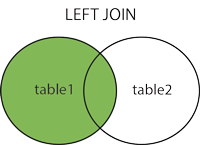
LEFT JOIN keyword returns all rows from the left table (table1), with the matching rows in the right table (table2). The result is NULL in the right side when there is no match.
Outer Join, on the other hand, will return matching rows from both tables as well as any unmatched rows from one or both the tables (based on whether it is single outer or full outer join respectively).
Outer Join can be full outer or single outer
Notice in our record set that there is no employee in the department 5 (Logistics). Because of this if we perform inner join, then Department 5 does not appear in the above result. However in the below query we perform an outer join (dept left outer join emp), and we can see this department.
SELECT dept.name DEPARTMENT, emp.name EMPLOYEE FROM DEPT dept, EMPLOYEE emp WHERE dept.id = emp.dept_id (+)
-------------------------------------------------------------------------------------------------
LEFT JOIN keyword returns all rows from the left table (table1), with the matching rows in the right table (table2). The result is NULL in the right side when there is no match.
SQL LEFT JOIN Syntax
SELECT column_name(s)
FROM table1
LEFT JOIN table2
ON table1.column_name=table2.column_name;
or:
SELECT column_name(s)
FROM table1
LEFT OUTER JOIN table2
ON table1.column_name=table2.column_name;
SELECT column_name(s)
FROM table1
LEFT JOIN table2
ON table1.column_name=table2.column_name;
or:
SELECT column_name(s)
FROM table1
LEFT OUTER JOIN table2
ON table1.column_name=table2.column_name;
In some databases LEFT JOIN is called LEFT OUTER JOIN.
"Customers" table:
CustomerID CustomerName ContactName Address City PostalCode Country 1 Alfreds Futterkiste Maria Anders Obere Str. 57 Berlin 12209 Germany 2 Ana Trujillo Emparedados y helados Ana Trujillo Avda. de la Constitución 2222 México D.F. 05021 Mexico 3 Antonio Moreno Taquería Antonio Moreno Mataderos 2312 México D.F. 05023 Mexico
And a selection from the "Orders" table:
OrderID CustomerID EmployeeID OrderDate ShipperID 10308 2 7 1996-09-18 3 10309 37 3 1996-09-19 1 10310 77 8 1996-09-20 2
In some databases LEFT JOIN is called LEFT OUTER JOIN.
"Customers" table:
| CustomerID | CustomerName | ContactName | Address | City | PostalCode | Country |
|---|---|---|---|---|---|---|
| 1 | Alfreds Futterkiste | Maria Anders | Obere Str. 57 | Berlin | 12209 | Germany |
| 2 | Ana Trujillo Emparedados y helados | Ana Trujillo | Avda. de la Constitución 2222 | México D.F. | 05021 | Mexico |
| 3 | Antonio Moreno Taquería | Antonio Moreno | Mataderos 2312 | México D.F. | 05023 | Mexico |
And a selection from the "Orders" table:
| OrderID | CustomerID | EmployeeID | OrderDate | ShipperID |
|---|---|---|---|---|
| 10308 | 2 | 7 | 1996-09-18 | 3 |
| 10309 | 37 | 3 | 1996-09-19 | 1 |
| 10310 | 77 | 8 | 1996-09-20 | 2 |
The following SQL statement will return all customers, and any orders they might have:
Example
SELECT Customers.CustomerName, Orders.OrderID
FROM Customers
LEFT JOIN Orders
ON Customers.CustomerID=Orders.CustomerID
ORDER BY Customers.CustomerName;
Note: The LEFT JOIN keyword returns all the rows from the left table (Customers), even if there are no matches in the right table (Orders).
SELECT Customers.CustomerName, Orders.OrderID
FROM Customers
LEFT JOIN Orders
ON Customers.CustomerID=Orders.CustomerID
ORDER BY Customers.CustomerName;
Number of Records: 213
CustomerName OrderID Alfreds Futterkiste null Ana Trujillo Emparedados y helados 10308 Antonio Moreno Taquería 10365 Around the Horn 10355
Tutorial Points:
LEFT JOIN returns all rows from the left table, even if there are no matches in the right table. This means that if the ON clause matches 0 (zero) records in right table, the join will still return a row in the result, but with NULL in each column from right table.
The basic syntax of LEFT JOIN is as follows:
SELECT table1.column1, table2.column2...
FROM table1
LEFT JOIN table2
ON table1.common_field = table2.common_field;
(a) CUSTOMERS table is as follows:
+----+----------+-----+-----------+----------+
| ID | NAME     | AGE | ADDRESS   | SALARY   |
+----+----------+-----+-----------+----------+
|  1 | Ramesh   |  32 | Ahmedabad |  2000.00 |
|  2 | Khilan   |  25 | Delhi     |  1500.00 |
|  3 | kaushik  |  23 | Kota      |  2000.00 |
|  4 | Chaitali |  25 | Mumbai    |  6500.00 |
|  5 | Hardik   |  27 | Bhopal    |  8500.00 |
|  6 | Komal    |  22 | MP        |  4500.00 |
|  7 | Muffy    |  24 | Indore    | 10000.00 |
+----+----------+-----+-----------+----------+
(b) Another table is ORDERS as follows:
+-----+---------------------+-------------+--------+
| OID | DATE                | CUSTOMER_ID | AMOUNT |
+-----+---------------------+-------------+--------+
| 102 | 2009-10-08 00:00:00 |           3 |   3000 |
| 100 | 2009-10-08 00:00:00 |           3 |   1500 |
| 101 | 2009-11-20 00:00:00 |           2 |   1560 |
| 103 | 2008-05-20 00:00:00 |           4 |   2060 |
+-----+---------------------+-------------+--------+
Now, let us join these two tables using LEFT JOIN as follows:
SQL> SELECT  ID, NAME, AMOUNT, DATE
     FROM CUSTOMERS
     LEFT JOIN ORDERS
     ON CUSTOMERS.ID = ORDERS.CUSTOMER_ID;
This would produce the following result:
+----+----------+--------+---------------------+
| ID | NAME     | AMOUNT | DATE                |
+----+----------+--------+---------------------+
|  1 | Ramesh   |   NULL | NULL                |
|  2 | Khilan   |   1560 | 2009-11-20 00:00:00 |
|  3 | kaushik  |   3000 | 2009-10-08 00:00:00 |
|  3 | kaushik  |   1500 | 2009-10-08 00:00:00 |
|  4 | Chaitali |   2060 | 2008-05-20 00:00:00 |
|  5 | Hardik   |   NULL | NULL                |
|  6 | Komal    |   NULL | NULL                |
|  7 | Muffy    |   NULL | NULL                |
+----+----------+--------+---------------------+
-------------------------------------------------------------------------------------------------
Interview: LEFT JOIN
Number of Records: 213
| CustomerName | OrderID |
|---|---|
| Alfreds Futterkiste | null |
| Ana Trujillo Emparedados y helados | 10308 |
| Antonio Moreno Taquería | 10365 |
| Around the Horn | 10355 |
Tutorial Points:
LEFT JOIN returns all rows from the left table, even if there are no matches in the right table. This means that if the ON clause matches 0 (zero) records in right table, the join will still return a row in the result, but with NULL in each column from right table.
The basic syntax of LEFT JOIN is as follows:
SELECT table1.column1, table2.column2... FROM table1 LEFT JOIN table2 ON table1.common_field = table2.common_field;
(a) CUSTOMERS table is as follows:
+----+----------+-----+-----------+----------+ | ID | NAME | AGE | ADDRESS | SALARY | +----+----------+-----+-----------+----------+ | 1 | Ramesh | 32 | Ahmedabad | 2000.00 | | 2 | Khilan | 25 | Delhi | 1500.00 | | 3 | kaushik | 23 | Kota | 2000.00 | | 4 | Chaitali | 25 | Mumbai | 6500.00 | | 5 | Hardik | 27 | Bhopal | 8500.00 | | 6 | Komal | 22 | MP | 4500.00 | | 7 | Muffy | 24 | Indore | 10000.00 | +----+----------+-----+-----------+----------+
(b) Another table is ORDERS as follows:
+-----+---------------------+-------------+--------+ | OID | DATE | CUSTOMER_ID | AMOUNT | +-----+---------------------+-------------+--------+ | 102 | 2009-10-08 00:00:00 | 3 | 3000 | | 100 | 2009-10-08 00:00:00 | 3 | 1500 | | 101 | 2009-11-20 00:00:00 | 2 | 1560 | | 103 | 2008-05-20 00:00:00 | 4 | 2060 | +-----+---------------------+-------------+--------+
Now, let us join these two tables using LEFT JOIN as follows:
SQL> SELECT ID, NAME, AMOUNT, DATE FROM CUSTOMERS LEFT JOIN ORDERS ON CUSTOMERS.ID = ORDERS.CUSTOMER_ID;
This would produce the following result:
+----+----------+--------+---------------------+ | ID | NAME | AMOUNT | DATE | +----+----------+--------+---------------------+ | 1 | Ramesh | NULL | NULL | | 2 | Khilan | 1560 | 2009-11-20 00:00:00 | | 3 | kaushik | 3000 | 2009-10-08 00:00:00 | | 3 | kaushik | 1500 | 2009-10-08 00:00:00 | | 4 | Chaitali | 2060 | 2008-05-20 00:00:00 | | 5 | Hardik | NULL | NULL | | 6 | Komal | NULL | NULL | | 7 | Muffy | NULL | NULL | +----+----------+--------+---------------------+
-------------------------------------------------------------------------------------------------
Interview: LEFT JOIN
What is the difference between JOIN and UNION?
SQL JOIN allows us to “lookup” records on other table based on the given conditions between two tables. For example, if we have the department ID of each employee, then we can use this department ID of the employee table to join with the department ID of department table to lookup department names.
UNION operation allows us to add 2 similar data sets to create resulting data set that contains all the data from the source data sets. Union does not require any condition for joining. For example, if you have 2 employee tables with same structure, you can UNION them to create one result set that will contain all the employees from both of the tables.
SELECT * FROM EMP1
UNION
SELECT * FROM EMP2;
SQL JOIN allows us to “lookup” records on other table based on the given conditions between two tables. For example, if we have the department ID of each employee, then we can use this department ID of the employee table to join with the department ID of department table to lookup department names.
UNION operation allows us to add 2 similar data sets to create resulting data set that contains all the data from the source data sets. Union does not require any condition for joining. For example, if you have 2 employee tables with same structure, you can UNION them to create one result set that will contain all the employees from both of the tables.
SELECT * FROM EMP1 UNION SELECT * FROM EMP2;
-------------------------------------------------------------------------------------------------------------------
W3Schools
SQL FULL OUTER JOIN Keyword
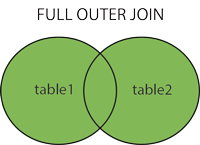
The FULL OUTER JOIN keyword returns all rows from the left table (table1) and from the right table (table2).
The FULL OUTER JOIN keyword combines the result of both LEFT and RIGHT joins.
The FULL OUTER JOIN keyword returns all rows from the left table (table1) and from the right table (table2).
The FULL OUTER JOIN keyword combines the result of both LEFT and RIGHT joins.
SQL FULL OUTER JOIN Syntax
SELECT column_name(s)
FROM table1
FULL OUTER JOIN table2
ON table1.column_name=table2.column_name;
SELECT column_name(s)
FROM table1
FULL OUTER JOIN table2
ON table1.column_name=table2.column_name;
"Customers" table:
CustomerID CustomerName ContactName Address City PostalCode Country 1 Alfreds Futterkiste Maria Anders Obere Str. 57 Berlin 12209 Germany 2 Ana Trujillo Emparedados y helados Ana Trujillo Avda. de la Constitución 2222 México D.F. 05021 Mexico 3 Antonio Moreno Taquería Antonio Moreno Mataderos 2312 México D.F. 05023 Mexico
And a selection from the "Orders" table:
OrderID CustomerID EmployeeID OrderDate ShipperID 10308 2 7 1996-09-18 3 10309 37 3 1996-09-19 1 10310 77 8 1996-09-20 2
| CustomerID | CustomerName | ContactName | Address | City | PostalCode | Country |
|---|---|---|---|---|---|---|
| 1 | Alfreds Futterkiste | Maria Anders | Obere Str. 57 | Berlin | 12209 | Germany |
| 2 | Ana Trujillo Emparedados y helados | Ana Trujillo | Avda. de la Constitución 2222 | México D.F. | 05021 | Mexico |
| 3 | Antonio Moreno Taquería | Antonio Moreno | Mataderos 2312 | México D.F. | 05023 | Mexico |
And a selection from the "Orders" table:
| OrderID | CustomerID | EmployeeID | OrderDate | ShipperID |
|---|---|---|---|---|
| 10308 | 2 | 7 | 1996-09-18 | 3 |
| 10309 | 37 | 3 | 1996-09-19 | 1 |
| 10310 | 77 | 8 | 1996-09-20 | 2 |
SELECT Customers.CustomerName, Orders.OrderID
FROM Customers
FULL OUTER JOIN Orders
ON Customers.CustomerID=Orders.CustomerID
ORDER BY Customers.CustomerName;
A selection from the result set may look like this:
CustomerName OrderID Alfreds Futterkiste Ana Trujillo Emparedados y helados 10308 Antonio Moreno Taquería 10365 10382 10351
Note: The FULL OUTER JOIN keyword returns all the rows from the left table (Customers), and all the rows from the right table (Orders). If there are rows in "Customers" that do not have matches in "Orders", or if there are rows in "Orders" that do not have matches in "Customers", those rows will be listed as well.
Tutorialspoint
FULL JOIN combines the results of both left and right outer joins.
The joined table will contain all records from both tables, and fill in NULLs for missing matches on either side.
The basic syntax of FULL JOIN is as follows:
SELECT table1.column1, table2.column2...
FROM table1
FULL JOIN table2
ON table1.common_field = table2.common_field;
(a) CUSTOMERS table is as follows:
+----+----------+-----+-----------+----------+
| ID | NAME     | AGE | ADDRESS   | SALARY   |
+----+----------+-----+-----------+----------+
|  1 | Ramesh   |  32 | Ahmedabad |  2000.00 |
|  2 | Khilan   |  25 | Delhi     |  1500.00 |
|  3 | kaushik  |  23 | Kota      |  2000.00 |
|  4 | Chaitali |  25 | Mumbai    |  6500.00 |
|  5 | Hardik   |  27 | Bhopal    |  8500.00 |
|  6 | Komal    |  22 | MP        |  4500.00 |
|  7 | Muffy    |  24 | Indore    | 10000.00 |
+----+----------+-----+-----------+----------+
(b) Another table is ORDERS as follows:
+-----+---------------------+-------------+--------+
|OID  | DATE                | CUSTOMER_ID | AMOUNT |
+-----+---------------------+-------------+--------+
| 102 | 2009-10-08 00:00:00 |           3 |   3000 |
| 100 | 2009-10-08 00:00:00 |           3 |   1500 |
| 101 | 2009-11-20 00:00:00 |           2 |   1560 |
| 103 | 2008-05-20 00:00:00 |           4 |   2060 |
+-----+---------------------+-------------+--------+
SQL> SELECT  ID, NAME, AMOUNT, DATE
     FROM CUSTOMERS
     FULL JOIN ORDERS
     ON CUSTOMERS.ID = ORDERS.CUSTOMER_ID;
This would produce the following result:
+------+----------+--------+---------------------+
| ID   | NAME     | AMOUNT | DATE                |
+------+----------+--------+---------------------+
|    1 | Ramesh   |   NULL | NULL                |
|    2 | Khilan   |   1560 | 2009-11-20 00:00:00 |
|    3 | kaushik  |   3000 | 2009-10-08 00:00:00 |
|    3 | kaushik  |   1500 | 2009-10-08 00:00:00 |
|    4 | Chaitali |   2060 | 2008-05-20 00:00:00 |
|    5 | Hardik   |   NULL | NULL                |
|    6 | Komal    |   NULL | NULL                |
|    7 | Muffy    |   NULL | NULL                |
|    3 | kaushik  |   3000 | 2009-10-08 00:00:00 |
|    3 | kaushik  |   1500 | 2009-10-08 00:00:00 |
|    2 | Khilan   |   1560 | 2009-11-20 00:00:00 |
|    4 | Chaitali |   2060 | 2008-05-20 00:00:00 |
+------+----------+--------+---------------------+
-------------------------------------------------------------------------------------------------
Interview: FULL JOIN
-----------------------------------------------------------------------------------------------
SELECT Customers.CustomerName, Orders.OrderID
FROM Customers
FULL OUTER JOIN Orders
ON Customers.CustomerID=Orders.CustomerID
ORDER BY Customers.CustomerName;
A selection from the result set may look like this:
| CustomerName | OrderID |
|---|---|
| Alfreds Futterkiste | |
| Ana Trujillo Emparedados y helados | 10308 |
| Antonio Moreno Taquería | 10365 |
| 10382 | |
| 10351 |
Note: The FULL OUTER JOIN keyword returns all the rows from the left table (Customers), and all the rows from the right table (Orders). If there are rows in "Customers" that do not have matches in "Orders", or if there are rows in "Orders" that do not have matches in "Customers", those rows will be listed as well.
Tutorialspoint
FULL JOIN combines the results of both left and right outer joins.
The joined table will contain all records from both tables, and fill in NULLs for missing matches on either side.
The basic syntax of FULL JOIN is as follows:
SELECT table1.column1, table2.column2... FROM table1 FULL JOIN table2 ON table1.common_field = table2.common_field;
(a) CUSTOMERS table is as follows:
+----+----------+-----+-----------+----------+ | ID | NAME | AGE | ADDRESS | SALARY | +----+----------+-----+-----------+----------+ | 1 | Ramesh | 32 | Ahmedabad | 2000.00 | | 2 | Khilan | 25 | Delhi | 1500.00 | | 3 | kaushik | 23 | Kota | 2000.00 | | 4 | Chaitali | 25 | Mumbai | 6500.00 | | 5 | Hardik | 27 | Bhopal | 8500.00 | | 6 | Komal | 22 | MP | 4500.00 | | 7 | Muffy | 24 | Indore | 10000.00 | +----+----------+-----+-----------+----------+
(b) Another table is ORDERS as follows:
+-----+---------------------+-------------+--------+ |OID | DATE | CUSTOMER_ID | AMOUNT | +-----+---------------------+-------------+--------+ | 102 | 2009-10-08 00:00:00 | 3 | 3000 | | 100 | 2009-10-08 00:00:00 | 3 | 1500 | | 101 | 2009-11-20 00:00:00 | 2 | 1560 | | 103 | 2008-05-20 00:00:00 | 4 | 2060 | +-----+---------------------+-------------+--------+
SQL> SELECT ID, NAME, AMOUNT, DATE FROM CUSTOMERS FULL JOIN ORDERS ON CUSTOMERS.ID = ORDERS.CUSTOMER_ID;
This would produce the following result:
+------+----------+--------+---------------------+ | ID | NAME | AMOUNT | DATE | +------+----------+--------+---------------------+ | 1 | Ramesh | NULL | NULL | | 2 | Khilan | 1560 | 2009-11-20 00:00:00 | | 3 | kaushik | 3000 | 2009-10-08 00:00:00 | | 3 | kaushik | 1500 | 2009-10-08 00:00:00 | | 4 | Chaitali | 2060 | 2008-05-20 00:00:00 | | 5 | Hardik | NULL | NULL | | 6 | Komal | NULL | NULL | | 7 | Muffy | NULL | NULL | | 3 | kaushik | 3000 | 2009-10-08 00:00:00 | | 3 | kaushik | 1500 | 2009-10-08 00:00:00 | | 2 | Khilan | 1560 | 2009-11-20 00:00:00 | | 4 | Chaitali | 2060 | 2008-05-20 00:00:00 | +------+----------+--------+---------------------+
-------------------------------------------------------------------------------------------------
Interview: FULL JOIN
-----------------------------------------------------------------------------------------------
SQL RIGHT JOIN Keyword
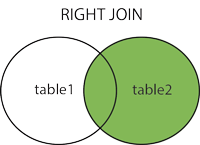
The RIGHT JOIN keyword returns all rows from the right table (table2), with the matching rows in the left table (table1). The result is NULL in the left side when there is no match.
The RIGHT JOIN keyword returns all rows from the right table (table2), with the matching rows in the left table (table1). The result is NULL in the left side when there is no match.
SQL RIGHT JOIN Syntax
SELECT column_name(s)
FROM table1
RIGHT JOIN table2
ON table1.column_name=table2.column_name;
or:
SELECT column_name(s)
FROM table1
RIGHT OUTER JOIN table2
ON table1.column_name=table2.column_name;
PS! In some databases RIGHT JOIN is called RIGHT OUTER JOIN.
"Orders" table:
OrderID CustomerID EmployeeID OrderDate ShipperID 10308 2 7 1996-09-18 3 10309 37 3 1996-09-19 1 10310 77 8 1996-09-20 2
And a selection from the "Employees" table:
EmployeeID LastName FirstName BirthDate Photo Notes 1 Davolio Nancy 12/8/1968 EmpID1.pic Education includes a BA in psychology..... 2 Fuller Andrew 2/19/1952 EmpID2.pic Andrew received his BTS commercial and.... 3 Leverling Janet 8/30/1963 EmpID3.pic Janet has a BS degree in chemistry....
SELECT column_name(s)
FROM table1
RIGHT JOIN table2
ON table1.column_name=table2.column_name;
or:
SELECT column_name(s)
FROM table1
RIGHT OUTER JOIN table2
ON table1.column_name=table2.column_name;
PS! In some databases RIGHT JOIN is called RIGHT OUTER JOIN.
"Orders" table:
| OrderID | CustomerID | EmployeeID | OrderDate | ShipperID |
|---|---|---|---|---|
| 10308 | 2 | 7 | 1996-09-18 | 3 |
| 10309 | 37 | 3 | 1996-09-19 | 1 |
| 10310 | 77 | 8 | 1996-09-20 | 2 |
And a selection from the "Employees" table:
| EmployeeID | LastName | FirstName | BirthDate | Photo | Notes |
|---|---|---|---|---|---|
| 1 | Davolio | Nancy | 12/8/1968 | EmpID1.pic | Education includes a BA in psychology..... |
| 2 | Fuller | Andrew | 2/19/1952 | EmpID2.pic | Andrew received his BTS commercial and.... |
| 3 | Leverling | Janet | 8/30/1963 | EmpID3.pic | Janet has a BS degree in chemistry.... |
SQL RIGHT JOIN Example
The following SQL statement will return all employees, and any orders they have placed:
The following SQL statement will return all employees, and any orders they have placed:
Example
SELECT Orders.OrderID, Employees.FirstName
FROM Orders
RIGHT JOIN Employees
ON Orders.EmployeeID=Employees.EmployeeID
ORDER BY Orders.OrderID;
Note: The RIGHT JOIN keyword returns all the rows from the right table (Employees), even if there are no matches in the left table (Orders).
Tutorials Point
RIGHT JOIN returns all rows from the right table, even if there are no matches in the left table. This means that if the ON clause matches 0 (zero) records in left table, the join will still return a row in the result, but with NULL in each column from left table.
The basic syntax of RIGHT JOIN is as follows:
SELECT table1.column1, table2.column2...
FROM table1
RIGHT JOIN table2
ON table1.common_field = table2.common_field;
SELECT Orders.OrderID, Employees.FirstName
FROM Orders
RIGHT JOIN Employees
ON Orders.EmployeeID=Employees.EmployeeID
ORDER BY Orders.OrderID;
Note: The RIGHT JOIN keyword returns all the rows from the right table (Employees), even if there are no matches in the left table (Orders).
Tutorials Point
RIGHT JOIN returns all rows from the right table, even if there are no matches in the left table. This means that if the ON clause matches 0 (zero) records in left table, the join will still return a row in the result, but with NULL in each column from left table.
The basic syntax of RIGHT JOIN is as follows:
SELECT table1.column1, table2.column2... FROM table1 RIGHT JOIN table2 ON table1.common_field = table2.common_field;
Example:
Consider the following two tables, (a) CUSTOMERS table is as follows:
+----+----------+-----+-----------+----------+
| ID | NAME     | AGE | ADDRESS   | SALARY   |
+----+----------+-----+-----------+----------+
|  1 | Ramesh   |  32 | Ahmedabad |  2000.00 |
|  2 | Khilan   |  25 | Delhi     |  1500.00 |
|  3 | kaushik  |  23 | Kota      |  2000.00 |
|  4 | Chaitali |  25 | Mumbai    |  6500.00 |
|  5 | Hardik   |  27 | Bhopal    |  8500.00 |
|  6 | Komal    |  22 | MP        |  4500.00 |
|  7 | Muffy    |  24 | Indore    | 10000.00 |
+----+----------+-----+-----------+----------+
(b) Another table is ORDERS as follows:
+-----+---------------------+-------------+--------+
|OID  | DATE                | CUSTOMER_ID | AMOUNT |
+-----+---------------------+-------------+--------+
| 102 | 2009-10-08 00:00:00 |           3 |   3000 |
| 100 | 2009-10-08 00:00:00 |           3 |   1500 |
| 101 | 2009-11-20 00:00:00 |           2 |   1560 |
| 103 | 2008-05-20 00:00:00 |           4 |   2060 |
+-----+---------------------+-------------+--------+
Now, let us join these two tables using RIGHT JOIN as follows:
SQL> SELECT  ID, NAME, AMOUNT, DATE
     FROM CUSTOMERS
     RIGHT JOIN ORDERS
     ON CUSTOMERS.ID = ORDERS.CUSTOMER_ID;
This would produce the following result:
+------+----------+--------+---------------------+
| ID   | NAME     | AMOUNT | DATE                |
+------+----------+--------+---------------------+
|    3 | kaushik  |   3000 | 2009-10-08 00:00:00 |
|    3 | kaushik  |   1500 | 2009-10-08 00:00:00 |
|    2 | Khilan   |   1560 | 2009-11-20 00:00:00 |
|    4 | Chaitali |   2060 | 2008-05-20 00:00:00 |
+------+----------+--------+---------------------+
-------------------------------------------------------------------------------------------------
Interview: Right JOIN
-------------------------------------------------------------------------------------------------
SELF JOIN is used to join a table to itself as if the table were two tables, temporarily renaming at least one table in the SQL statement.
SELF JOIN is as follows:
SELECT a.column_name, b.column_name...
FROM table1 a, table1 b
WHERE a.common_field = b.common_field;
Here, WHERE clause could be any given expression based on your requirement.
Consider the following two tables, (a) CUSTOMERS table is as follows:
+----+----------+-----+-----------+----------+
| ID | NAME     | AGE | ADDRESS   | SALARY   |
+----+----------+-----+-----------+----------+
|  1 | Ramesh   |  32 | Ahmedabad |  2000.00 |
|  2 | Khilan   |  25 | Delhi     |  1500.00 |
|  3 | kaushik  |  23 | Kota      |  2000.00 |
|  4 | Chaitali |  25 | Mumbai    |  6500.00 |
|  5 | Hardik   |  27 | Bhopal    |  8500.00 |
|  6 | Komal    |  22 | MP        |  4500.00 |
|  7 | Muffy    |  24 | Indore    | 10000.00 |
+----+----------+-----+-----------+----------+
(b) Another table is ORDERS as follows:
+-----+---------------------+-------------+--------+ |OID | DATE | CUSTOMER_ID | AMOUNT | +-----+---------------------+-------------+--------+ | 102 | 2009-10-08 00:00:00 | 3 | 3000 | | 100 | 2009-10-08 00:00:00 | 3 | 1500 | | 101 | 2009-11-20 00:00:00 | 2 | 1560 | | 103 | 2008-05-20 00:00:00 | 4 | 2060 | +-----+---------------------+-------------+--------+
Now, let us join these two tables using RIGHT JOIN as follows:
SQL> SELECT ID, NAME, AMOUNT, DATE FROM CUSTOMERS RIGHT JOIN ORDERS ON CUSTOMERS.ID = ORDERS.CUSTOMER_ID;
This would produce the following result:
+------+----------+--------+---------------------+ | ID | NAME | AMOUNT | DATE | +------+----------+--------+---------------------+ | 3 | kaushik | 3000 | 2009-10-08 00:00:00 | | 3 | kaushik | 1500 | 2009-10-08 00:00:00 | | 2 | Khilan | 1560 | 2009-11-20 00:00:00 | | 4 | Chaitali | 2060 | 2008-05-20 00:00:00 | +------+----------+--------+---------------------+
-------------------------------------------------------------------------------------------------
Interview: Right JOIN
-------------------------------------------------------------------------------------------------
SELF JOIN is used to join a table to itself as if the table were two tables, temporarily renaming at least one table in the SQL statement.
SELF JOIN is as follows:
SELECT a.column_name, b.column_name... FROM table1 a, table1 b WHERE a.common_field = b.common_field;
Here, WHERE clause could be any given expression based on your requirement.
Example:
Consider the following two tables, (a) CUSTOMERS table is as follows:
+----+----------+-----+-----------+----------+
| ID | NAME | AGE | ADDRESS | SALARY |
+----+----------+-----+-----------+----------+
| 1 | Ramesh | 32 | Ahmedabad | 2000.00 |
| 2 | Khilan | 25 | Delhi | 1500.00 |
| 3 | kaushik | 23 | Kota | 2000.00 |
| 4 | Chaitali | 25 | Mumbai | 6500.00 |
| 5 | Hardik | 27 | Bhopal | 8500.00 |
| 6 | Komal | 22 | MP | 4500.00 |
| 7 | Muffy | 24 | Indore | 10000.00 |
+----+----------+-----+-----------+----------+
Now, let us join this table using SELF JOIN as follows:
SQL> SELECT  a.ID, b.NAME, a.SALARY
     FROM CUSTOMERS a, CUSTOMERS b
     WHERE a.SALARY < b.SALARY;
This would produce the following result:
+----+----------+---------+
| ID | NAME     | SALARY  |
+----+----------+---------+
|  2 | Ramesh   | 1500.00 |
|  2 | kaushik  | 1500.00 |
|  1 | Chaitali | 2000.00 |
|  2 | Chaitali | 1500.00 |
|  3 | Chaitali | 2000.00 |
|  6 | Chaitali | 4500.00 |
|  1 | Hardik   | 2000.00 |
|  2 | Hardik   | 1500.00 |
|  3 | Hardik   | 2000.00 |
|  4 | Hardik   | 6500.00 |
|  6 | Hardik   | 4500.00 |
|  1 | Komal    | 2000.00 |
|  2 | Komal    | 1500.00 |
|  3 | Komal    | 2000.00 |
|  1 | Muffy    | 2000.00 |
|  2 | Muffy    | 1500.00 |
|  3 | Muffy    | 2000.00 |
|  4 | Muffy    | 6500.00 |
|  5 | Muffy    | 8500.00 |
|  6 | Muffy    | 4500.00 |
+----+----------+---------+
---------------------------------------------------------------------------------
Interview Questions: Self Join
Consider the following two tables, (a) CUSTOMERS table is as follows:
+----+----------+-----+-----------+----------+ | ID | NAME | AGE | ADDRESS | SALARY | +----+----------+-----+-----------+----------+ | 1 | Ramesh | 32 | Ahmedabad | 2000.00 | | 2 | Khilan | 25 | Delhi | 1500.00 | | 3 | kaushik | 23 | Kota | 2000.00 | | 4 | Chaitali | 25 | Mumbai | 6500.00 | | 5 | Hardik | 27 | Bhopal | 8500.00 | | 6 | Komal | 22 | MP | 4500.00 | | 7 | Muffy | 24 | Indore | 10000.00 | +----+----------+-----+-----------+----------+
Now, let us join this table using SELF JOIN as follows:
SQL> SELECT a.ID, b.NAME, a.SALARY FROM CUSTOMERS a, CUSTOMERS b WHERE a.SALARY < b.SALARY;
This would produce the following result:
+----+----------+---------+ | ID | NAME | SALARY | +----+----------+---------+ | 2 | Ramesh | 1500.00 | | 2 | kaushik | 1500.00 | | 1 | Chaitali | 2000.00 | | 2 | Chaitali | 1500.00 | | 3 | Chaitali | 2000.00 | | 6 | Chaitali | 4500.00 | | 1 | Hardik | 2000.00 | | 2 | Hardik | 1500.00 | | 3 | Hardik | 2000.00 | | 4 | Hardik | 6500.00 | | 6 | Hardik | 4500.00 | | 1 | Komal | 2000.00 | | 2 | Komal | 1500.00 | | 3 | Komal | 2000.00 | | 1 | Muffy | 2000.00 | | 2 | Muffy | 1500.00 | | 3 | Muffy | 2000.00 | | 4 | Muffy | 6500.00 | | 5 | Muffy | 8500.00 | | 6 | Muffy | 4500.00 | +----+----------+---------+
---------------------------------------------------------------------------------
Interview Questions: Self Join
What is Self Join and why is it required?
Self Join is the act of joining one table with itself.
Self Join is often very useful to convert a hierarchical structure into a flat structure
In our employee table example above, we have kept the manager ID of each employee in the same row as that of the employee. This is an example of how a hierarchy (in this case employee-manager hierarchy) is stored in the RDBMS table. Now, suppose if we need to print out the names of the manager of each employee right beside the employee, we can use self join. See the example below:
SELECT e.name EMPLOYEE, m.name MANAGER
FROM EMPLOYEE e, EMPLOYEE m
WHERE e.mgr_id = m.id (+)
EMPLOYEE MANAGER Pete Hash Darl Hash Inno Hash Robo Hash Tomiti Robo Anno Robo Privy Robo Meme Pete Bhuti Tomiti Hash
The only reason we have performed a left outer join here (instead of INNER JOIN) is we have one employee in this table without a manager (employee ID = 1). If we perform inner join, this employee will not show-up.
---------------------------------------------------------------------------------
CARTESIAN JOIN or CROSS JOIN returns the Cartesian product of the sets of records from the two or more joined tables. Thus, it equates to an inner join where the join-condition always evaluates to True or where the join-condition is absent from the statement.
Self Join is the act of joining one table with itself.
Self Join is often very useful to convert a hierarchical structure into a flat structure
In our employee table example above, we have kept the manager ID of each employee in the same row as that of the employee. This is an example of how a hierarchy (in this case employee-manager hierarchy) is stored in the RDBMS table. Now, suppose if we need to print out the names of the manager of each employee right beside the employee, we can use self join. See the example below:
SELECT e.name EMPLOYEE, m.name MANAGER FROM EMPLOYEE e, EMPLOYEE m WHERE e.mgr_id = m.id (+)
| EMPLOYEE | MANAGER |
|---|---|
| Pete | Hash |
| Darl | Hash |
| Inno | Hash |
| Robo | Hash |
| Tomiti | Robo |
| Anno | Robo |
| Privy | Robo |
| Meme | Pete |
| Bhuti | Tomiti |
| Hash |
The only reason we have performed a left outer join here (instead of INNER JOIN) is we have one employee in this table without a manager (employee ID = 1). If we perform inner join, this employee will not show-up.
---------------------------------------------------------------------------------
CARTESIAN JOIN or CROSS JOIN returns the Cartesian product of the sets of records from the two or more joined tables. Thus, it equates to an inner join where the join-condition always evaluates to True or where the join-condition is absent from the statement.
Syntax:
The basic syntax of CARTESIAN JOIN or CROSS JOIN is as follows:
SELECT table1.column1, table2.column2...
FROM  table1, table2 [, table3 ]
The basic syntax of CARTESIAN JOIN or CROSS JOIN is as follows:
SELECT table1.column1, table2.column2... FROM table1, table2 [, table3 ]
Example:
Consider the following two tables, (a) CUSTOMERS table is as follows:
+----+----------+-----+-----------+----------+
| ID | NAME     | AGE | ADDRESS   | SALARY   |
+----+----------+-----+-----------+----------+
|  1 | Ramesh   |  32 | Ahmedabad |  2000.00 |
|  2 | Khilan   |  25 | Delhi     |  1500.00 |
|  3 | kaushik  |  23 | Kota      |  2000.00 |
|  4 | Chaitali |  25 | Mumbai    |  6500.00 |
|  5 | Hardik   |  27 | Bhopal    |  8500.00 |
|  6 | Komal    |  22 | MP        |  4500.00 |
|  7 | Muffy    |  24 | Indore    | 10000.00 |
+----+----------+-----+-----------+----------+
(b) Another table is ORDERS as follows:
+-----+---------------------+-------------+--------+
|OID  | DATE                | CUSTOMER_ID | AMOUNT |
+-----+---------------------+-------------+--------+
| 102 | 2009-10-08 00:00:00 |           3 |   3000 |
| 100 | 2009-10-08 00:00:00 |           3 |   1500 |
| 101 | 2009-11-20 00:00:00 |           2 |   1560 |
| 103 | 2008-05-20 00:00:00 |           4 |   2060 |
+-----+---------------------+-------------+--------+
Now, let us join these two tables using INNER JOIN as follows:
SQL> SELECT  ID, NAME, AMOUNT, DATE
     FROM CUSTOMERS, ORDERS;
This would produce the following result:
+----+----------+--------+---------------------+
| ID | NAME     | AMOUNT | DATE                |
+----+----------+--------+---------------------+
|  1 | Ramesh   |   3000 | 2009-10-08 00:00:00 |
|  1 | Ramesh   |   1500 | 2009-10-08 00:00:00 |
|  1 | Ramesh   |   1560 | 2009-11-20 00:00:00 |
|  1 | Ramesh   |   2060 | 2008-05-20 00:00:00 |
|  2 | Khilan   |   3000 | 2009-10-08 00:00:00 |
|  2 | Khilan   |   1500 | 2009-10-08 00:00:00 |
|  2 | Khilan   |   1560 | 2009-11-20 00:00:00 |
|  2 | Khilan   |   2060 | 2008-05-20 00:00:00 |
|  3 | kaushik  |   3000 | 2009-10-08 00:00:00 |
|  3 | kaushik  |   1500 | 2009-10-08 00:00:00 |
|  3 | kaushik  |   1560 | 2009-11-20 00:00:00 |
|  3 | kaushik  |   2060 | 2008-05-20 00:00:00 |
|  4 | Chaitali |   3000 | 2009-10-08 00:00:00 |
|  4 | Chaitali |   1500 | 2009-10-08 00:00:00 |
|  4 | Chaitali |   1560 | 2009-11-20 00:00:00 |
|  4 | Chaitali |   2060 | 2008-05-20 00:00:00 |
|  5 | Hardik   |   3000 | 2009-10-08 00:00:00 |
|  5 | Hardik   |   1500 | 2009-10-08 00:00:00 |
|  5 | Hardik   |   1560 | 2009-11-20 00:00:00 |
|  5 | Hardik   |   2060 | 2008-05-20 00:00:00 |
|  6 | Komal    |   3000 | 2009-10-08 00:00:00 |
|  6 | Komal    |   1500 | 2009-10-08 00:00:00 |
|  6 | Komal    |   1560 | 2009-11-20 00:00:00 |
|  6 | Komal    |   2060 | 2008-05-20 00:00:00 |
|  7 | Muffy    |   3000 | 2009-10-08 00:00:00 |
|  7 | Muffy    |   1500 | 2009-10-08 00:00:00 |
|  7 | Muffy    |   1560 | 2009-11-20 00:00:00 |
|  7 | Muffy    |   2060 | 2008-05-20 00:00:00 |
+----+----------+--------+---------------------+
---------------------------------------------------------------------------------
Interview Questions: Cross Join(Cartesian Join)
Cross Join: It gives a result which is equal to the no. of rows in the one table multiplied by the no. of rows in the other table (if there is no WHERE clause used). This type of result set is named as Cartesian Product. CROSS JOIN performs like an INNER JOIN if WHERE clause is used.
There is an alternative way of retrieving the same result set by giving column names (comma (‘,’) separated) in SELECT statement and mentioning the names of table after the FROM clause.
Syntax of CROSS JOIN:
Select *
FROM table_1
CROSS JOIN table_2;
Example of CROSS JOIN:
In this example, two tables are taken from Northwind database for example Orders & Employees.
SELECT * FROM Orders;
Consider the following two tables, (a) CUSTOMERS table is as follows:
+----+----------+-----+-----------+----------+ | ID | NAME | AGE | ADDRESS | SALARY | +----+----------+-----+-----------+----------+ | 1 | Ramesh | 32 | Ahmedabad | 2000.00 | | 2 | Khilan | 25 | Delhi | 1500.00 | | 3 | kaushik | 23 | Kota | 2000.00 | | 4 | Chaitali | 25 | Mumbai | 6500.00 | | 5 | Hardik | 27 | Bhopal | 8500.00 | | 6 | Komal | 22 | MP | 4500.00 | | 7 | Muffy | 24 | Indore | 10000.00 | +----+----------+-----+-----------+----------+
(b) Another table is ORDERS as follows:
+-----+---------------------+-------------+--------+ |OID | DATE | CUSTOMER_ID | AMOUNT | +-----+---------------------+-------------+--------+ | 102 | 2009-10-08 00:00:00 | 3 | 3000 | | 100 | 2009-10-08 00:00:00 | 3 | 1500 | | 101 | 2009-11-20 00:00:00 | 2 | 1560 | | 103 | 2008-05-20 00:00:00 | 4 | 2060 | +-----+---------------------+-------------+--------+
Now, let us join these two tables using INNER JOIN as follows:
SQL> SELECT ID, NAME, AMOUNT, DATE FROM CUSTOMERS, ORDERS;
This would produce the following result:
+----+----------+--------+---------------------+ | ID | NAME | AMOUNT | DATE | +----+----------+--------+---------------------+ | 1 | Ramesh | 3000 | 2009-10-08 00:00:00 | | 1 | Ramesh | 1500 | 2009-10-08 00:00:00 | | 1 | Ramesh | 1560 | 2009-11-20 00:00:00 | | 1 | Ramesh | 2060 | 2008-05-20 00:00:00 | | 2 | Khilan | 3000 | 2009-10-08 00:00:00 | | 2 | Khilan | 1500 | 2009-10-08 00:00:00 | | 2 | Khilan | 1560 | 2009-11-20 00:00:00 | | 2 | Khilan | 2060 | 2008-05-20 00:00:00 | | 3 | kaushik | 3000 | 2009-10-08 00:00:00 | | 3 | kaushik | 1500 | 2009-10-08 00:00:00 | | 3 | kaushik | 1560 | 2009-11-20 00:00:00 | | 3 | kaushik | 2060 | 2008-05-20 00:00:00 | | 4 | Chaitali | 3000 | 2009-10-08 00:00:00 | | 4 | Chaitali | 1500 | 2009-10-08 00:00:00 | | 4 | Chaitali | 1560 | 2009-11-20 00:00:00 | | 4 | Chaitali | 2060 | 2008-05-20 00:00:00 | | 5 | Hardik | 3000 | 2009-10-08 00:00:00 | | 5 | Hardik | 1500 | 2009-10-08 00:00:00 | | 5 | Hardik | 1560 | 2009-11-20 00:00:00 | | 5 | Hardik | 2060 | 2008-05-20 00:00:00 | | 6 | Komal | 3000 | 2009-10-08 00:00:00 | | 6 | Komal | 1500 | 2009-10-08 00:00:00 | | 6 | Komal | 1560 | 2009-11-20 00:00:00 | | 6 | Komal | 2060 | 2008-05-20 00:00:00 | | 7 | Muffy | 3000 | 2009-10-08 00:00:00 | | 7 | Muffy | 1500 | 2009-10-08 00:00:00 | | 7 | Muffy | 1560 | 2009-11-20 00:00:00 | | 7 | Muffy | 2060 | 2008-05-20 00:00:00 | +----+----------+--------+---------------------+
---------------------------------------------------------------------------------
Interview Questions: Cross Join(Cartesian Join)
Cross Join: It gives a result which is equal to the no. of rows in the one table multiplied by the no. of rows in the other table (if there is no WHERE clause used). This type of result set is named as Cartesian Product. CROSS JOIN performs like an INNER JOIN if WHERE clause is used.
There is an alternative way of retrieving the same result set by giving column names (comma (‘,’) separated) in SELECT statement and mentioning the names of table after the FROM clause.
Syntax of CROSS JOIN:
There is an alternative way of retrieving the same result set by giving column names (comma (‘,’) separated) in SELECT statement and mentioning the names of table after the FROM clause.
Syntax of CROSS JOIN:
Select *
FROM table_1
CROSS JOIN table_2;
Example of CROSS JOIN:
In this example, two tables are taken from Northwind database for example Orders & Employees.
SELECT * FROM Orders;
Difference between Cross Join & Full Outer Join
Difference between Cross Join & Full Outer Join
In SQL Server, there are many types of Joins with which data can be matched and can produce desired results. In this post, we will be differentiating between two SQL server Joins - Cross Join & Full Outer Join.
Cross Join: It gives a result which is equal to the no. of rows in the one table multiplied by the no. of rows in the other table (if there is no WHERE clause used). This type of result set is named as Cartesian Product. CROSS JOIN performs like an INNER JOIN if WHERE clause is used.
There is an alternative way of retrieving the same result set by giving column names (comma (‘,’) separated) in SELECT statement and mentioning the names of table after the FROM clause.
Syntax of CROSS JOIN:
Select *
FROM table_1
CROSS JOIN table_2;
Example of CROSS JOIN:
In this example, two tables are taken from Northwind database for example Orders & Employees.
SELECT * FROM Orders;

It returns 830 rows.
SELECT * FROM Employees

It returns 9 rows.
Now, if we execute CROSS JOIN command, it will return the Cartesian Product of both tables and result into 7470 rows (830 x 9).
Select *
FROM Orders
CROSS JOIN Employees;

Full Outer Join: Unlike Inner join, Outer join returns all the rows that meets WHERE or HAVING condition from at least one table taken in the FROM clause of SELECT statement. Left outer join retrieves all the rows from left table referenced in SELECT command, and a Right outer join retrieves all the rows from the right table referenced in SELECT command.
Full Outer Join returns all rows from both the tables (i.e. left & right). By using a Full Outer Join in SELECT command, one can retain the non-matching information by considering non-matching rows in the results of a join.
Syntax of Full Outer Join:
SELECT Table_1_Alias.*,Table_2_Alias.*
FROM Table_1 Table_1_Alias
FULL OUTER JOIN Table_2 Table_2_Alias
ON Table_1_Alias.Table_1_Matching_Column = Table_2_Alias.Table_2_Matching_Column;
Example of Full Outer Join:
In this example, 2 tables are taken from Northwind database for example Customers & Orders.
SELECT * FROM Orders;

It has 830 rows.
SELECT * FROM Customers;

It has 91 rows.
Let’s execute SELECT command with LEFT OUTER JOIN first, then RIGHT OUTER JOIN and in the end FULL OUTER JOIN.
---------------------------------------------------------------------------------
Difference between Cross Join & Full Outer Join
In SQL Server, there are many types of Joins with which data can be matched and can produce desired results. In this post, we will be differentiating between two SQL server Joins - Cross Join & Full Outer Join.
Cross Join: It gives a result which is equal to the no. of rows in the one table multiplied by the no. of rows in the other table (if there is no WHERE clause used). This type of result set is named as Cartesian Product. CROSS JOIN performs like an INNER JOIN if WHERE clause is used.
There is an alternative way of retrieving the same result set by giving column names (comma (‘,’) separated) in SELECT statement and mentioning the names of table after the FROM clause.
Syntax of CROSS JOIN:
Example of CROSS JOIN:
In this example, two tables are taken from Northwind database for example Orders & Employees.
SELECT * FROM Orders;
It returns 830 rows.
SELECT * FROM Employees
It returns 9 rows.
Now, if we execute CROSS JOIN command, it will return the Cartesian Product of both tables and result into 7470 rows (830 x 9).
Full Outer Join: Unlike Inner join, Outer join returns all the rows that meets WHERE or HAVING condition from at least one table taken in the FROM clause of SELECT statement. Left outer join retrieves all the rows from left table referenced in SELECT command, and a Right outer join retrieves all the rows from the right table referenced in SELECT command.
Full Outer Join returns all rows from both the tables (i.e. left & right). By using a Full Outer Join in SELECT command, one can retain the non-matching information by considering non-matching rows in the results of a join.
Syntax of Full Outer Join:
Example of Full Outer Join:
In this example, 2 tables are taken from Northwind database for example Customers & Orders.
SELECT * FROM Orders;
It has 830 rows.
SELECT * FROM Customers;
It has 91 rows.
Let’s execute SELECT command with LEFT OUTER JOIN first, then RIGHT OUTER JOIN and in the end FULL OUTER JOIN.
In SQL Server, there are many types of Joins with which data can be matched and can produce desired results. In this post, we will be differentiating between two SQL server Joins - Cross Join & Full Outer Join.
Cross Join: It gives a result which is equal to the no. of rows in the one table multiplied by the no. of rows in the other table (if there is no WHERE clause used). This type of result set is named as Cartesian Product. CROSS JOIN performs like an INNER JOIN if WHERE clause is used.
There is an alternative way of retrieving the same result set by giving column names (comma (‘,’) separated) in SELECT statement and mentioning the names of table after the FROM clause.
Syntax of CROSS JOIN:
Select * FROM table_1 CROSS JOIN table_2;
Example of CROSS JOIN:
In this example, two tables are taken from Northwind database for example Orders & Employees.
SELECT * FROM Orders;
It returns 830 rows.
SELECT * FROM Employees
It returns 9 rows.
Now, if we execute CROSS JOIN command, it will return the Cartesian Product of both tables and result into 7470 rows (830 x 9).
Select * FROM Orders CROSS JOIN Employees;
Full Outer Join: Unlike Inner join, Outer join returns all the rows that meets WHERE or HAVING condition from at least one table taken in the FROM clause of SELECT statement. Left outer join retrieves all the rows from left table referenced in SELECT command, and a Right outer join retrieves all the rows from the right table referenced in SELECT command.
Full Outer Join returns all rows from both the tables (i.e. left & right). By using a Full Outer Join in SELECT command, one can retain the non-matching information by considering non-matching rows in the results of a join.
Syntax of Full Outer Join:
SELECT Table_1_Alias.*,Table_2_Alias.* FROM Table_1 Table_1_Alias FULL OUTER JOIN Table_2 Table_2_Alias ON Table_1_Alias.Table_1_Matching_Column = Table_2_Alias.Table_2_Matching_Column;
Example of Full Outer Join:
In this example, 2 tables are taken from Northwind database for example Customers & Orders.
SELECT * FROM Orders;
It has 830 rows.
SELECT * FROM Customers;
It has 91 rows.
Let’s execute SELECT command with LEFT OUTER JOIN first, then RIGHT OUTER JOIN and in the end FULL OUTER JOIN.
---------------------------------------------------------------------------------

No comments:
Post a Comment